Learning how to build an AI agent with tool use is the step that separates a chatbot from a system that can act — querying APIs, running code, reading files, and composing multi-step workflows without human intervention at each turn.
Tool use, sometimes called function calling, works by giving a language model structured descriptions of available functions. The model decides when to call one, emits a structured payload, and your runtime executes the actual logic before feeding results back into the context. The model never runs code directly — your orchestration layer does.
This guide covers the full implementation path: defining tool schemas, wiring a tool-calling API, handling the execution loop, managing errors gracefully, and avoiding the design mistakes that cause agents to stall or hallucinate tool arguments. Code examples use OpenAI’s function calling interface, but the patterns apply across Anthropic, Gemini, and open-weight models with equivalent APIs.
Understanding the Tool-Use Execution Loop

🔧 Related tools & reading:
📘 Building LLM Powered Applications — $49.99 at World of Books
🤖 Building Agent-Powered Applications : Your guide to generative AI, RAG, fine-tuning, and orchestration for production use — $39.99 at eBooks.com
🔧 Mastering LLM Tool Calling: Build ActionDriven AI Systems with Function Calling, Agents, and RealWorld Integrations — $23.00 at Walmart
Before writing a single line of agent code, it’s worth building a clear mental model of what actually happens during a tool-use cycle. The loop is deceptively simple in diagrams but contains several failure surfaces that trip up most early implementations. At its core, the cycle works like this: the model receives a prompt, determines that completing the task requires external information or action, emits a structured tool call rather than a natural language response, your application executes the corresponding function, and the result is injected back into the conversation context before the model continues. That last step — feeding the tool result back into the context — is where many implementations get it wrong.
When learning how to build an AI agent with tool use, the most important thing to internalize is that the model never directly executes anything. It produces a structured output — typically a JSON object conforming to a schema you’ve defined — that signals intent. Your orchestration layer is responsible for routing that intent to the correct function, handling errors, and formatting the result in a way the model can reason over. The model is stateless between turns; it only knows what you put in the context window. This means your scaffolding is doing more architectural work than most tutorials acknowledge.
The function calling interface exposed by major inference APIs follows a consistent pattern: you declare tool schemas alongside your system prompt, and the model either responds in natural language or returns a structured tool call object with a name and arguments. A well-implemented agent tool integration involves more than just passing that object to a handler — it involves validating arguments against the schema, enforcing timeouts, capturing exceptions cleanly, and deciding whether a failed tool call should be retried, surfaced to the user, or handled silently with a fallback. The model needs to know what happened, not just receive silence.
Multi-step reasoning introduces additional complexity. A capable model will chain tool calls across multiple turns — querying a database, interpreting the result, then calling a separate API based on that interpretation. Each round trip expands the context window and compounds latency. Architects building production agents typically set explicit turn limits, instrument each tool call with tracing identifiers, and log the full conversation state at every step. Without that observability, debugging a broken reasoning chain is genuinely painful — you’re reverse-engineering decisions made by a probabilistic model with no execution trace.
Understanding this loop in mechanical detail changes how you structure everything downstream: which tools you expose, how granular their schemas are, how you handle partial failures, and how you design prompts that encourage reliable tool selection. Treating the execution loop as a black box is the single most reliable way to ship an agent that works in demos and falls apart in production.
Defining Tool Schemas That Models Reliably Follow
🔧 Related tools & reading:
📘 Building LLM Powered Applications — $49.99 at World of Books
🤖 Building Agent-Powered Applications : Your guide to generative AI, RAG, fine-tuning, and orchestration for production use — $39.99 at eBooks.com
🔧 Mastering LLM Tool Calling: Build ActionDriven AI Systems with Function Calling, Agents, and RealWorld Integrations — $23.00 at Walmart
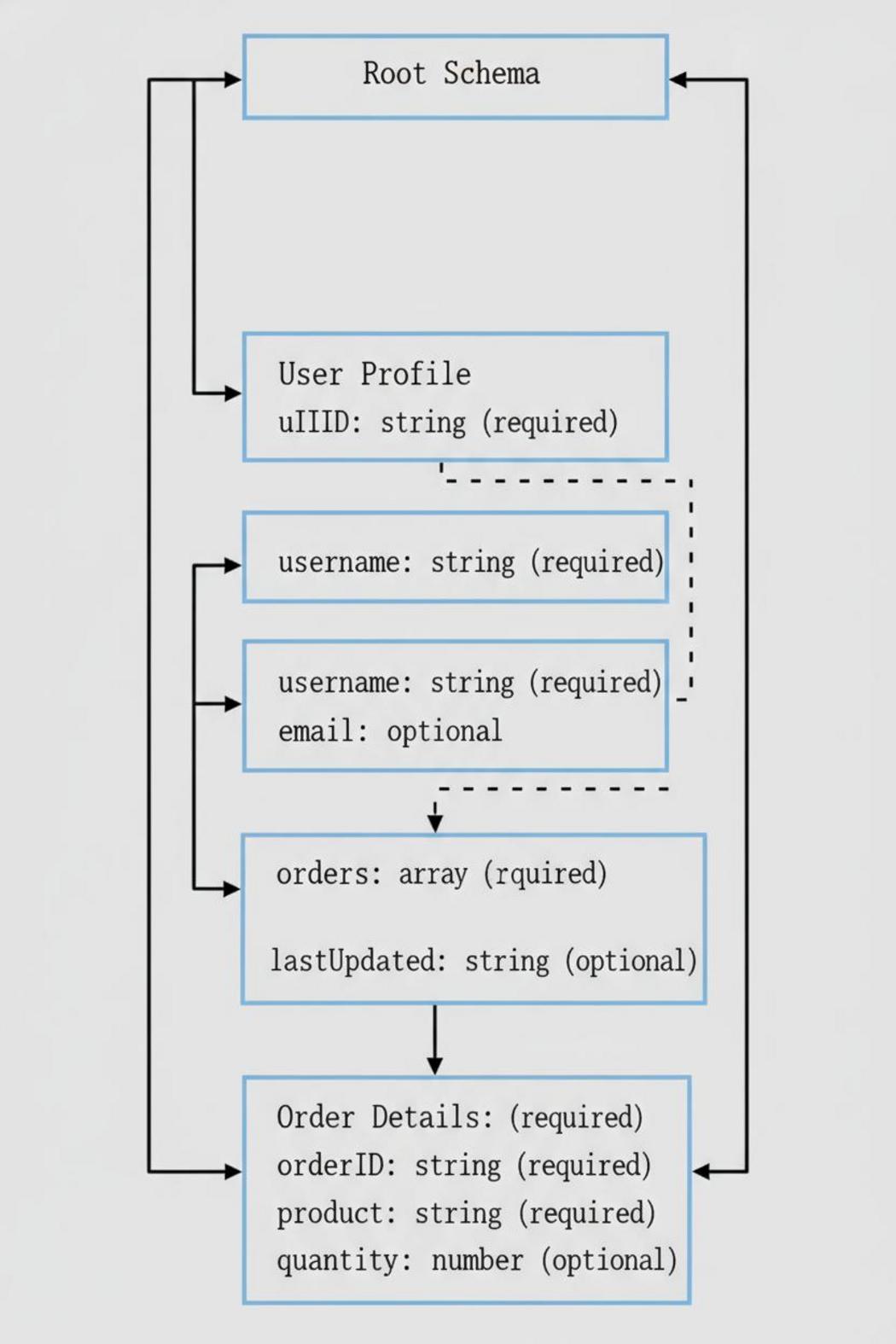
The reliability gap between a model that *can* call a tool and one that *does* call it correctly almost always lives in the schema definition. When you’re working through how to build an AI agent with tool use, it’s tempting to treat the JSON schema as boilerplate — a formality the framework generates for you. That instinct will cost you. The schema is not just documentation for the developer; it’s the primary signal the model uses to decide when to invoke a function, which arguments to populate, and how to handle ambiguity when the user’s intent is underspecified.
Parameter descriptions carry more weight than most practitioners expect. A field named date_range with no description will get filled inconsistently — sometimes a string, sometimes an object, sometimes an ISO interval, depending on what the model has seen during training. Add a precise natural-language description that specifies format, units, and an example value, and the variance collapses. This isn’t a quirk of a particular tool calling API; it reflects how instruction-tuned models generalize from schema metadata. The more semantically rich your descriptions, the closer you get to deterministic behavior on typical inputs.
Required versus optional fields deserve deliberate attention. Marking a parameter as required when it has a sensible default forces the model to ask clarifying questions or hallucinate a value — both failure modes. Conversely, making everything optional invites the model to omit fields that are practically necessary, producing calls your backend silently mishandles. The right discipline here is to model the schema after the actual invariants of the underlying function, not after what feels ergonomically convenient in the interface layer.
Enum constraints are one of the most underutilized precision tools in agent tool integration. If a parameter only accepts a closed set of values, declare it as an enum rather than a string with a description that lists the options. The model will respect the constraint more consistently when it’s expressed structurally, and you get a natural validation hook before the call ever leaves the agent runtime. The same logic applies to numeric bounds: use minimum and maximum in your schema when the domain has hard limits rather than hoping the model infers them from context.
One structural decision that quietly determines schema quality is whether you’re decomposing tools at the right granularity. A single tool with a twenty-field schema covering five conceptually distinct operations will produce poor function calling behavior — not because the model can’t handle complexity, but because the ambiguous action space makes selection unreliable. Lean toward narrower tools with cohesive parameter sets, and let the planner layer handle sequencing. That separation of concerns makes each schema easier to specify correctly and gives you cleaner telemetry when something goes wrong.
Wiring the Tool-Calling API and Handling Responses

🔧 Related tools & reading:
📘 Building LLM Powered Applications — $49.99 at World of Books
🤖 Building Agent-Powered Applications : Your guide to generative AI, RAG, fine-tuning, and orchestration for production use — $39.99 at eBooks.com
🔧 Mastering LLM Tool Calling: Build ActionDriven AI Systems with Function Calling, Agents, and RealWorld Integrations — $23.00 at Walmart
Once you’ve defined your tool schemas, the next step in building a functional agent is wiring those definitions into the model’s API call and writing the logic that handles what comes back. Most frontier model providers — OpenAI, Anthropic, Google — follow a broadly similar pattern, even if the field names differ. You pass your tool definitions alongside the conversation messages, and the model either generates a standard text response or returns a structured tool call object indicating it wants to invoke a specific function with specific arguments. Your agent loop needs to handle both cases cleanly, and most early implementations trip up by treating this as a simple if-else when the reality is more nuanced.
In practice, when the model returns a tool call, you’re receiving a JSON-serializable payload containing a function name and an arguments object. You deserialize that, route it to the appropriate local function, execute it, and capture the result. That result then gets injected back into the conversation history as a tool response message — a step that many ai agent tutorials underemphasize but that is strictly required. The model expects to see the output before it continues reasoning. Skipping or malforming this step produces degraded or hallucinated follow-up responses, because the model is left inferring what the function returned rather than actually seeing it.
Error handling at this layer deserves serious attention. Tool execution can fail for a dozen reasons: malformed arguments from the model, downstream API timeouts, invalid state, rate limits. A robust tool calling API integration doesn’t silently swallow these failures — it surfaces them to the model as structured error messages within the tool response. This allows the model to reason about the failure and potentially retry with corrected parameters or choose a fallback path. Agents that swallow errors and return empty strings tend to spiral into incoherent behavior, especially across multi-turn interactions where the context window grows and the model loses track of what actually happened.
Parallel tool calls add another layer of complexity. Some providers support returning multiple tool call requests in a single model turn, which your loop must handle concurrently or sequentially before resuming the conversation. If you’re learning how to build an AI agent with tool use that operates at any meaningful scale, designing your dispatch layer to handle batched calls from the start — rather than retrofitting it later — will save considerable refactoring. The loop structure itself should be explicit: parse the response type, route accordingly, append all results to history, and only then make the next model call. Keep this logic tight and observable, with logging at each stage, because tool-calling bugs are notoriously difficult to diagnose post-hoc without a clear trace of what the model requested and what it received in return.
Error Handling, Retries, and Agent Reliability Patterns
🔧 Related tools & reading:
📘 Building LLM Powered Applications — $49.99 at World of Books
🤖 Building Agent-Powered Applications : Your guide to generative AI, RAG, fine-tuning, and orchestration for production use — $39.99 at eBooks.com
🔧 Mastering LLM Tool Calling: Build ActionDriven AI Systems with Function Calling, Agents, and RealWorld Integrations — $23.00 at Walmart
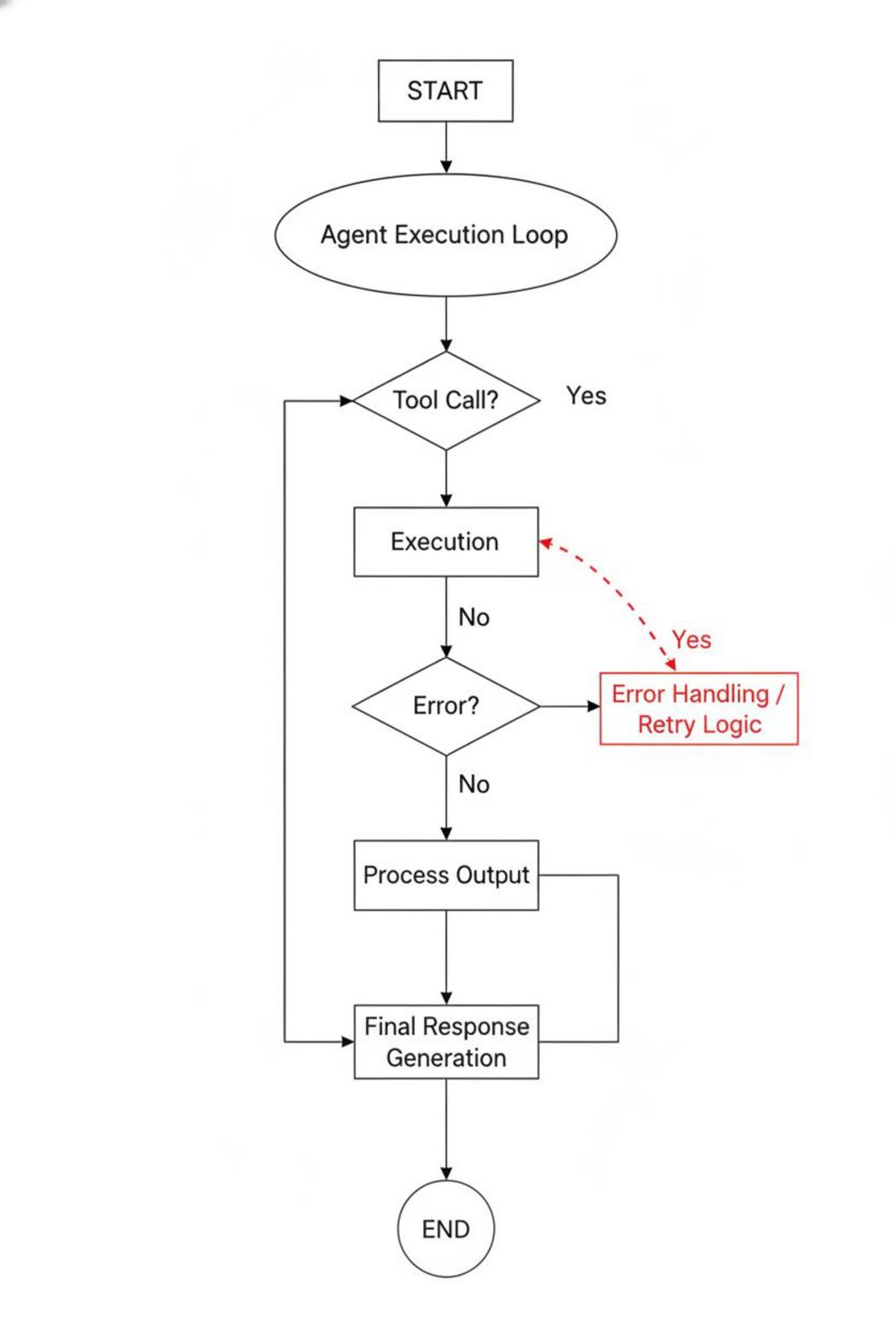
When you build an AI agent with tool use, error handling isn’t a polish step you add at the end — it’s a core architectural concern. Tool calls fail. APIs return unexpected shapes. Rate limits trigger mid-task. A model confidently invokes a function with malformed arguments. Any of these events, left unhandled, causes silent degradation or outright task failure, and the agent has no reliable way to recover without deliberate retry and fallback logic baked into the execution layer.
The most common pattern is structured retry with exponential backoff, applied at the tool-call boundary rather than at the model level. When a function calling API returns a transient error — a 429, a 503, a network timeout — the orchestration layer should catch that failure, wait, and reissue the call before surfacing the error state to the model. This keeps the model’s context clean. Feeding raw HTTP errors directly into the conversation history adds noise and can cause the model to make poor downstream decisions, like abandoning a valid plan because it misinterprets a recoverable infrastructure hiccup as a permanent capability constraint.
Beyond transient network failures, you also need to handle semantic errors: cases where the tool executes successfully but returns data the model misuses, or where the model generates a tool call with arguments that pass schema validation but fail domain logic. A robust agent tool integration layer distinguishes between these failure modes explicitly. Returning a structured error object — with a machine-readable code, a human-readable reason, and optionally a suggested correction — gives the model something to reason over rather than a blank wall. Models respond measurably better when error messages are informative and action-oriented rather than generic.
Retry budgets deserve explicit design attention. Allowing unbounded retries creates runaway loops; allowing only one retry is often too conservative for real-world tool environments. A reasonable default is three attempts per tool call with jittered backoff, combined with a global step limit across the full agent trajectory. The step limit serves as a circuit breaker against pathological reasoning loops, where the agent cycles through the same failing sequence without converging. Logging each tool invocation — including failures, retry counts, and resolution outcomes — provides the observability you need to tune these thresholds against real usage rather than guessing.
Idempotency is the final reliability concern that often gets overlooked in an ai agent tutorial context. If your agent retries a write operation — posting a record, sending a message, charging an account — without idempotency guarantees at the tool level, retries produce duplicate side effects. Designing tools to accept an idempotency key, or wrapping non-idempotent operations behind a check-then-act pattern, prevents this class of bug entirely. Reliability in agentic systems isn’t just about keeping the agent running; it’s about ensuring the actions it takes in the world are correct, bounded, and reversible where possible.
Conclusion
Tool use is not a feature you bolt onto an agent at the end — it is the architectural decision that defines what your agent can and cannot do in production. When you build an AI agent with tool use deliberately, selecting schemas carefully, enforcing strict input validation, and designing clean error-handling loops, you get a system that scales. Cut corners on any of those layers and reliability collapses under real-world load. Start small, test each tool in isolation, then compose. The architecture rewards precision.
Questions or something we should be covering? Reach out via the Contact page. ⚡